The Options panel contains settings for the appearance and behavior of the Equipment Hierarchy interface.
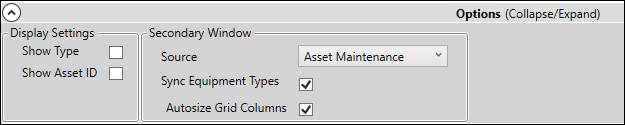
Display Settings
Show Type: Show asset type in the asset tree.s
Show Asset ID: Show Asset ID property value in the asset tree.
Secondary Window
Source: Select secondary window to use.
None: No secondary window.
Asset Detail: Show the Asset Detail secondary window.
Asset Maintenance: Show the Asset Maintenance secondary window.
Process Hierarchy: Show the Process Hierarchy secondary window.
Sync Equipment Types: For the Asset Maintenance window, when a branch is selected in the asset tree, automatically select the corresponding asset type.
Autosize Grid Columns: For Equipment Tab of Asset Maintenance window, automatically resize grid columns based on visible contents.