There are three default limit types that can be used in PARCview. Additional limit types can be configured here.
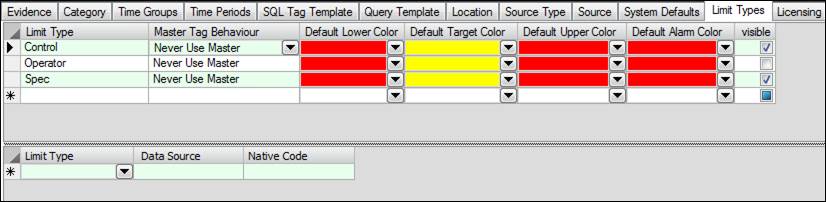
Limit Type: Typing into the bottom * row will create a new limit type name.
Master Tag Behavior: The default behavior for child tags. Child tags can either always or never use master tag limits by default. This setting can be overridden on a case-by-case basis in the Master Tag Editor.
Default Lower Color: The default color for a lower limit.
Default Target Color: The default color for the target.
Default Upper Color: The default color for an upper limit.
Default Alarm Color: The default color that a tag will turn when it is in alarm.
Visible: Toggles visibility of the limit type in PARCview.
Native Source Limits
Currently only supported for SQL-type sources.
Limit Type: Identifies the type of Limit in PARCview to map to the native source limit type.
Data Source: Identifies the data source containing the limits.
Native Code: Identifies the type of Limit in the data source to be pulled into PARCview.