The Application Button menu can be opened by clicking on the button in the upper left corner.
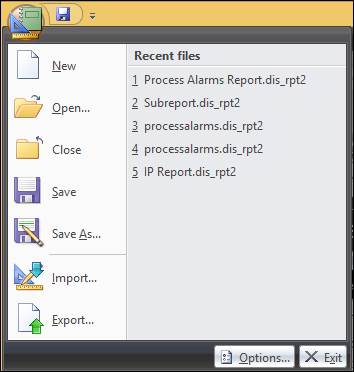
New: Launches the Report Wizard to create a new report. (Ctrl+N)
Open: Launches the file browser. (Ctrl+B)
Close: Closes the open report. The display will prompt the user to save if there are unsaved changes.
Save: Saves the file in its current state and location. If the report has not been saved before, the file browser will open. (Ctrl+S)
Save As: Launches the file browser to save the report in a new location or with a new name.
Import: Imports an existing report from another designer.
Export: Exports the report. A variety of file types can be chosen from.
Recent Files: The recent files section lists recently edited reports. One of these reports can be opened by clicking on it.
Options: Opens the Report Designer Options.