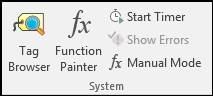
Tag Browser: Search for tags. You can drag tags from Tag Browser directly into any cell in Excel. In Data Normalize sheets, drag tags from Tag Browser into row 1 starting at column E over the text “Drag Tag Here.”
Function Painter: Build in-cell formulas that use tag data. If combined with the Timer function, formulas may update constantly.
Start Timer: Enable automatic updating of values from Function Painter, even if no action is performed in Excel. This setting can be specified in Client Configuration and System Defaults.
Show Errors: Review any recent errors.
Manual Mode: Show Function Painter only when manually activated. Normally it will be shown whenever a DataPARC formula is selected.