Purpose: Find out about merging trends in a MultiTrend.
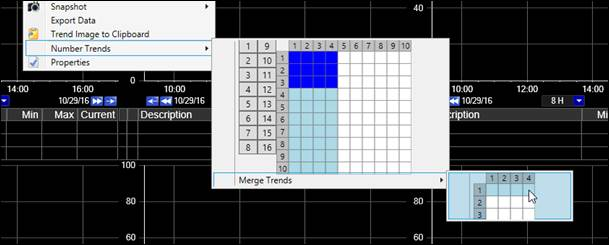
Task: Merge the top row of Trends in a 4x3 MultiTrend to make one wide trend. Do this with the Trend from the Create a MultiTrend task.
Steps:
Decide which Trends to merge into one. Right-click on the upper-left-most one of those Trends.
Select Number Trends, then select Merge Trends at the bottom of the pop-out menu.
Use the Merge Trends grid to highlight the trends to merge. Note you can only merge down and to the right in that grid.