Grades can be grouped into logical collections. This can be used in centerline, where runs from several different grades can be viewed simultaneously, or in MDE, where the visibility of MDE records can be filtered by grade. Select a Grade Type and then create groups in the left panel.
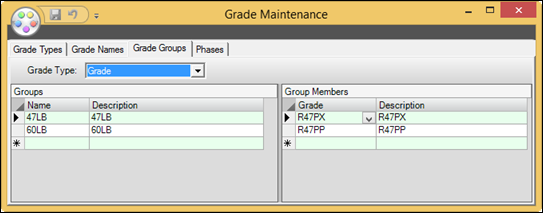
Grade Type: The Grade type containing the desired Grade names and groups.
Groups
Name: The name of the group. Create a new group by entering a name in the bottom empty row.
Description: The Description of the group. Can be a longer, more descriptive versions of the group name.
Group Members
Grade: The names of the grades contained in the group. Select a grade name from the drop-down menu.
Description: The description of each grade contained in the group.