Right-click an asset type to open the context menu.
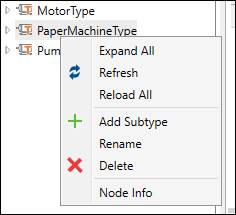
Expand All: Expand the entire hierarchy.
Refresh: Refresh the selected node and its children.
Reload All: Reload the entire tree.
Add Subtype: Add an asset type beneath the selected asset type. See New/Edit Asset Type.
Rename: Modify an asset type name. See New/Edit Asset Type.
Delete: Deletes the asset type.
Node Info: Show UA Node Attributes and References.