

Ribbon Bar
- 30 Jan 2024
- Print
- PDF
Ribbon Bar
- Updated on 30 Jan 2024
- Print
- PDF
Article summary
Did you find this summary helpful?
Thank you for your feedback!
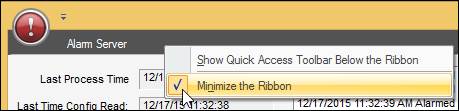
If the ribbon bar is not visible, right click in the menu header and uncheck “Minimize the Ribbon”.
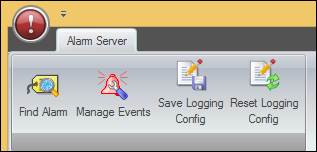
Alarm Server
Find Alarm: Opens a search tool to find a specific alarm or alarm type. Type the search text and click the Find button. Repeatedly clicking Find will proceed through the list of tags.

Manage Events: Opens the Manage Alarm Events window where Alarms can be redetected.
Save Logging Config: Saves the notification logging settings for all alarms so logging will continue after a server restart. The default storage location for the settings is AlarmServerLog.config in “C:\Program Files (x86)\Capstone\PARCAlarmServer”.
Reset Logging Config: Deletes logging configuration settings so that the log file only displays basic information like server startup and cycle start and end.
Was this article helpful?