

Limit Grid Right-Click Menu
- 05 Feb 2024
- Print
- PDF
Limit Grid Right-Click Menu
- Updated on 05 Feb 2024
- Print
- PDF
Article summary
Did you find this summary helpful?
Thank you for your feedback!
Right-click a row in the limit grid to open the context menu.
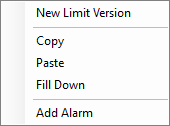
New Limit Version: Copies the row except with a Limit Start value of now.
Copy: When a row is selected, copy limit values to the clipboard.
Paste: When a row is selected, paste copied limit values.
Fill Down: When a range of rows is selected by holding SHIFT, fill down the top value to all cells.
Add Alarm: Open Alarm Configuration with a new SQC alarm created for the selected tag. Make sure to select the limit type of the alarm.
Was this article helpful?